



Close your account
Delete your account in the app or on the web, the 30-day grace period, and exactly what is removed, what is kept and for how long.
This is how you delete your Orsola account and the data in it — in the Orsola app, at www.orsola.ai, or by asking us if you cannot sign in. Orsola is made by Shuark Inc.
Before you do it
- Export your data first if you want any of it. Afterwards it is not available — see download a copy of your data.
- Export Nutrition separately if you used it. It is not in the account export and has its own, in its own Settings tab — your settings, and your nutrition data.
- Cancelling a plan is not closing an account. If you only want to stop paying, change, pause, or cancel your plan does that and leaves everything intact.
- If you have a plan, cancel it first — and choose to cancel now. Deletion cannot be scheduled while a plan is active, and a plan set to end at the close of its billing period still counts as active until that date.
- Take anything you need out of connected accounts. Files Orsola saved to your Drive stay in your Drive, but anything only inside Orsola goes.
Close it
In the Orsola app or at www.orsola.ai, open Settings. Under Danger Zone, choose Delete Account. You are taken through several steps on purpose:
- A warning describing what will happen.
- The terms to review and accept.
- A confirmation of your decision.
- Your two-step verification code, if you have it switched on.
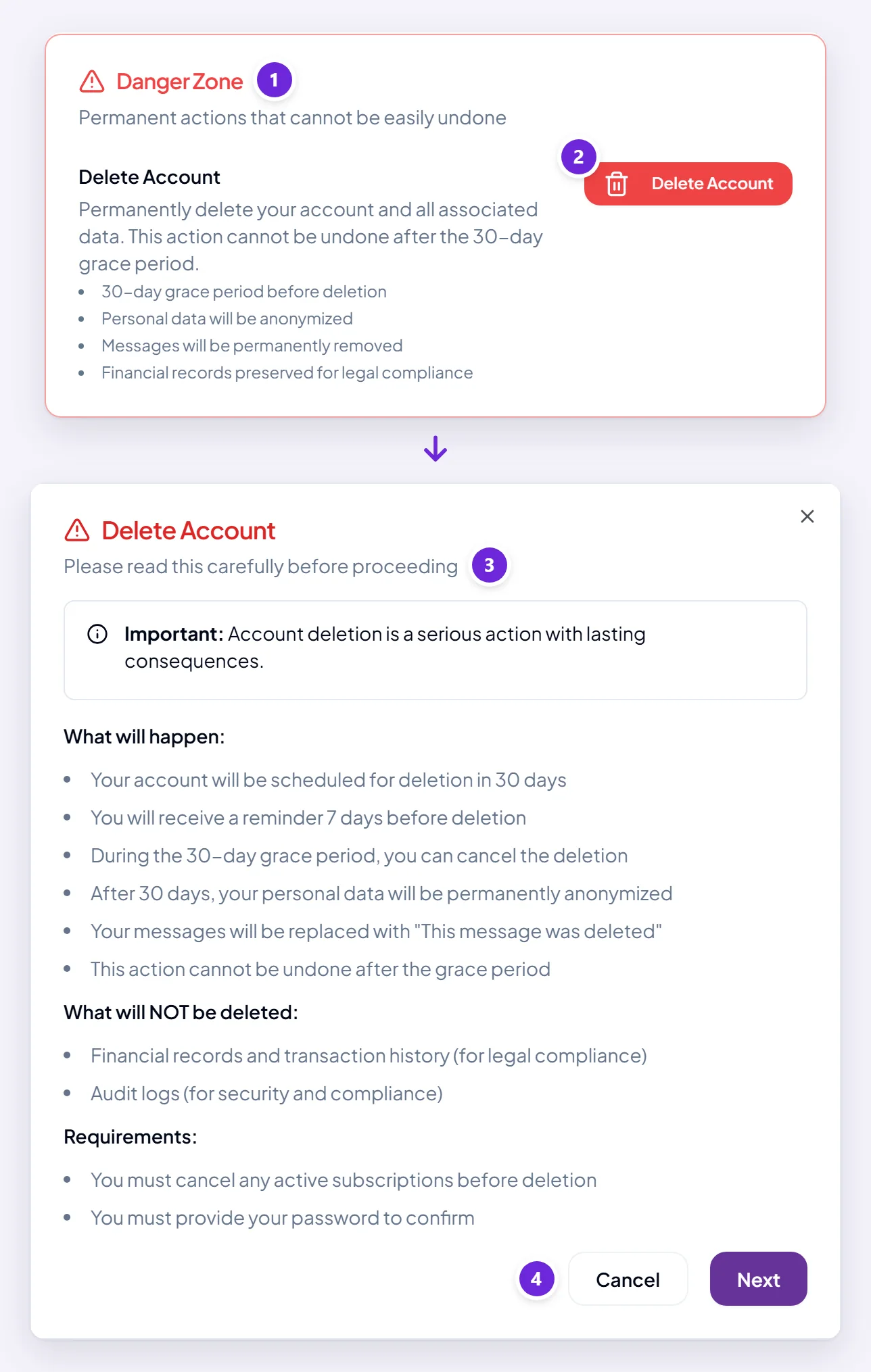
At the end, your account is scheduled for deletion in 30 days — not deleted then and there.
If you cannot sign in
Try cannot sign in? first — most sign-in problems are fixed there in a few minutes.
If you still cannot get in, send us a message through the contact form, which works without signing in. Write from the email address on the account and say you want the account deleted. Once we have confirmed it is yours, we schedule the deletion, with the same 30-day grace period and the same result as below.
The 30-day grace period
Nothing is irreversible for 30 days. During that time you can cancel the deletion and carry on as before, and we email you a reminder 21, 14 and 7 days before the date so it does not pass unnoticed.
Day 0
You confirm
Signed out everywhere, straight away — including any data export link
Days 9, 16 and 23
Reminders
We email you 21, 14 and 7 days before the date
Day 30
Permanent
Messages overwritten, account anonymised
Grace period — sign in and cancel the deletion at any time
It exists for the obvious reason: closing an account is a decision people occasionally make in a bad hour, and permanent means permanent.
To stop it, sign in during those 30 days and cancel the deletion.
What happens straight away
Some of it does not wait for the 30 days. The moment you confirm, you are signed out everywhere: every session, every trusted device and your sign-in history go immediately.
That includes any data export link you were sent, which is the practical reason the advice above is to export first and close afterwards, rather than the other way round.
What is removed after the 30 days, and what is kept
| What | What happens to it |
|---|---|
| The text of your messages | Overwritten and unreadable — the conversation shell remains, empty |
| Conversation titles | Replaced with a placeholder |
| What Orsola remembered about you, your reminders, your connected accounts, your backup codes and encryption keys | Deleted outright |
| Everything in Nutrition — meals, photos, weight, allergies and your profile | Deleted outright |
| Your account record — name, email, phone, picture | Anonymised, not deleted. The row stays, with nothing in it that identifies you |
| The security log of actions on the account | Kept for 12 months, with your email, address and device stripped out of it |
| Financial records — invoices, payments | Kept for 7 years, because tax law requires it |
Anonymised rather than deleted is the honest word for most of it. What identifies you is destroyed; some rows survive with nothing left in them that points back to a person. That is what makes it irreversible — there is no record left to restore you from.
The last row is not a loophole either. Businesses are required to retain records of money received for a period set by law, and that obligation does not end because a customer leaves. Those records are retained for that purpose and nothing else; the conversations and personal data they used to sit beside are gone.
After 30 days this cannot be undone, by you or by us. Starting again means a new account, with nothing carried over.
Delete some of your data, and keep the account
You do not have to close the account to remove things:
- A conversation — rename, tidy, or delete a conversation.
- A recording or its transcript — download, rename, or delete a recording.
- Files, images and videos — your gallery, where you can delete several at once.
- Everything in Nutrition — your settings, and your nutrition data.
- What Orsola has learned about you — tell it in conversation what to forget; see what Orsola has learned about you.
- A connected account — review, reconnect, or remove a connection.
For anything else you want removed, send us a message through the contact form. We delete it within 30 days of your request, the period our Privacy Policy sets for every deletion.
Where to go next
If you are closing the account because something went wrong, we would genuinely rather hear about it — talk to a person first. Plenty of what sends people to this page turns out to be fixable.