



Devices signed in to your account
See what is signed in, sign one out, or sign out everywhere at once.
See everything that is signed in
Open Settings and find Active Sessions — the devices currently signed in to your account.
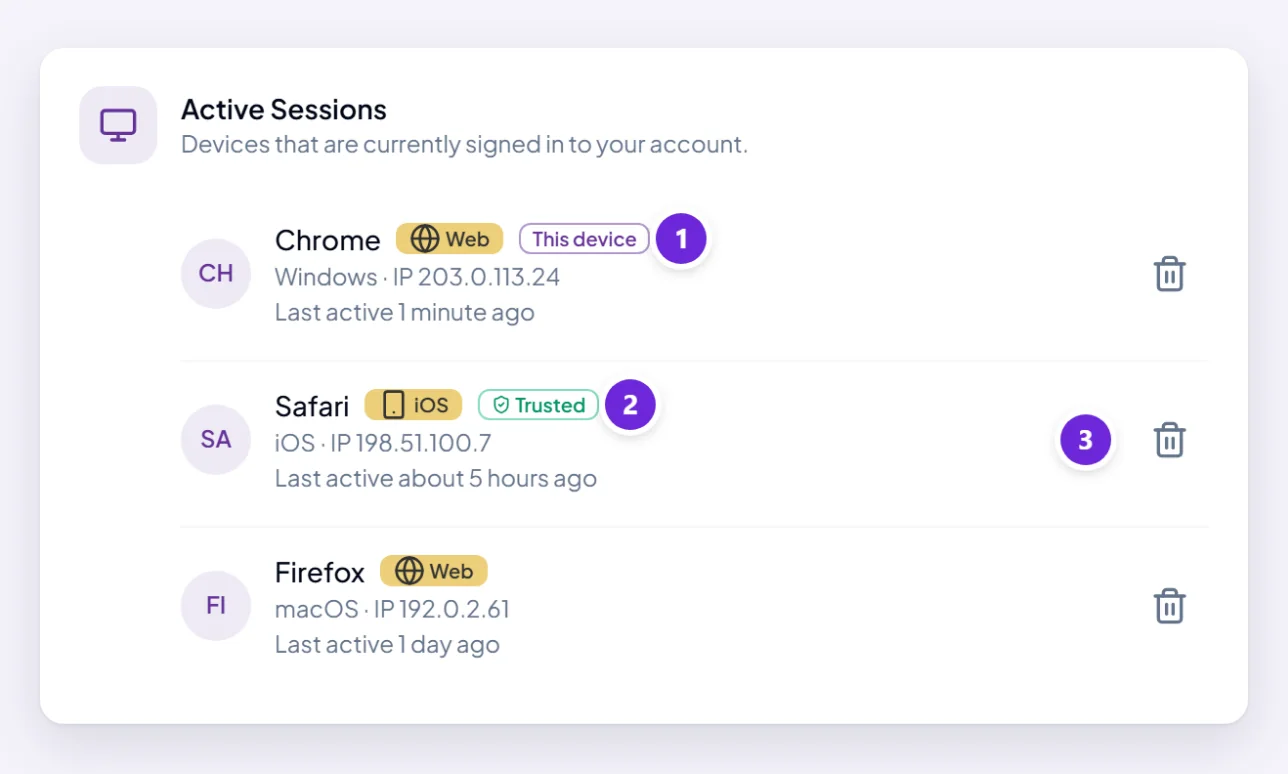
Each entry shows you enough to recognise it, or to know that you do not:
- The browser and operating system, and whether it is Web, iOS or Android.
- The IP address it is connecting from.
- When it signed in, and when it was last active.
- This device against the one you are using now.
- Trusted, if it is one you marked as trusted for two-step verification.
Sessions last 30 days, so old entries here are normal — a browser you used last week is still listed even though you have not been back.
Sign one device out
Choose Revoke session on it. That device is signed out immediately and has to sign in again.
Revoking the one marked This device signs you out, so you are asked to confirm first.
Worth doing for a work laptop you have handed back, a machine at a client's office, or anything you do not recognise.
Sign out everywhere
The stronger option, for when you think somebody else may have access. It does four things:
- Ends every active session.
- Logs out every device immediately.
- Resets every trusted device, so each one asks for a two-step code again next time.
- Signs you out here too, and sends you back to the sign-in page.
With two-step verification on you will be asked for a code to confirm — deliberately, since this is one of the things somebody who had got in would want to do.
Change your password as well. Signing out everywhere ends the sessions; it does not stop somebody signing straight back in with a password they already have. Do both, in that order — see change or reset your password.
If you see something you do not recognise
- Sign out everywhere.
- Change your password to something you have never used elsewhere.
- Turn on two-step verification if it is not on already — it is what stops this happening again.
- Check Integrations and remove anything connected that you did not connect.
Do not spend time trying to identify the device first. An unfamiliar IP address is often just a phone on mobile data, but the four steps above cost you five minutes and settle it either way.
Where to go next
Who can see your chats, files, and recordings covers what an account actually holds.