



Add a document, photo, or spreadsheet
Attach a file from your computer or a connected account, and ask a question that actually uses it.
What you can add
Documents and spreadsheets, images, audio and video — up to 5 files in one message, each up to 20 MB. The full list of formats is in what Orsola can read, and the limits.
A file you attach belongs to the conversation you attach it to. Orsola can use it for any question later in that same conversation, so you do not need to attach it again.
Add from your computer, camera, or photos
- Choose the + beside the message box. On a computer, this opens your file chooser straight away — go on to step 3.
- On a phone or tablet, pick Files for documents and spreadsheets, Photos for pictures and video you already have, or Camera to take one now.
- Select up to five. They appear as thumbnails above the message box, and you can remove one with the × on its thumbnail before you send.
- Type your question and send. The files go with the message.
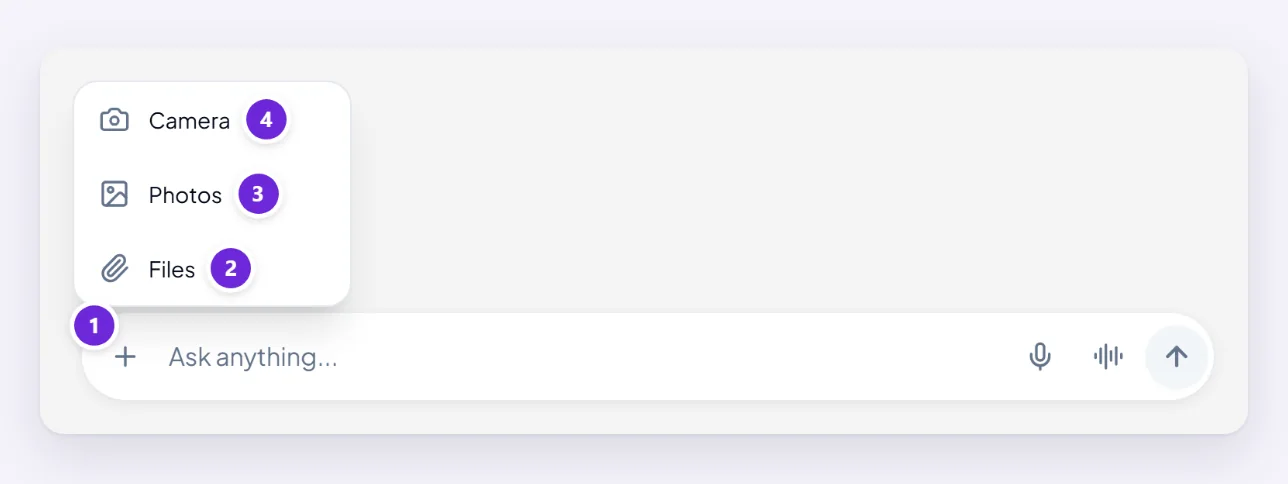
One quirk worth knowing: the Files dialog filters to documents, images, audio and video, so spreadsheets and slide decks may look unavailable. They are accepted — switch the dialog to All files and pick the spreadsheet, and it will upload normally.
Use a file from Google Drive or OneDrive
There is no Drive or OneDrive picker in the message box. Connected accounts work the other way round: you connect the account once, then ask, and Orsola fetches the file itself.
"Find the spreadsheet called Q3 Budget in my OneDrive and tell me which category grew the most."
Google Drive is narrower than you would expect, on purpose. Orsola is given access to individual Drive items rather than to your whole Drive, so it can work with files it created for you and files you have specifically opened with it — and it genuinely cannot see the rest. If it says it cannot find something in your Drive, that does not mean the file is missing; it means the file was never handed to it. Attaching a downloaded copy from the message box always works.
OneDrive is not limited that way and can search across your files.
Connect the account first — what connecting an account lets Orsola do covers what each one may and may not touch. With nothing connected, Orsola will say so rather than guess.
Ask a question that actually uses the file
Attaching a file and asking "what do you think?" gets you a summary. Ask for the thing you actually wanted from it:
- "Pull out every date and deadline in this and put them in a table."
- "I am the buyer here. What in this obliges me to pay anything after the first year?"
- "This is our expenses sheet. Which category grew the most between the first and last month?"
- "Read this rejection email and draft a short reply asking what would change their mind."
With several files attached, say which is which — "compare the two invoices; the older one is the PDF" — otherwise Orsola has to guess at what you are contrasting.
If the file will not go through
Three messages cover almost every case, and each one tells you exactly what to change:
- "File … exceeds 20MB limit" — the file is too big. Split it, export a smaller version, or compress the images inside it.
- "Maximum 5 files allowed" — send them across two messages. The first batch stays available in the conversation.
- "File … type is not allowed" — the format is not one Orsola reads. The list has the alternatives; exporting to PDF works for most things.
If the upload fails with none of those, file will not upload, or Orsola ignored it? goes through the rest.