


Log a meal
Photograph it, search for it, or just say it — then check the draft before it counts.
Four ways in
The bar along the bottom of the Nutrition workspace has three buttons — Photo, Scan and Quick add — and you can also just say it on the Chat tab.
- Photo. Photograph the plate. Orsola splits it into separate items and estimates each portion.
- Quick add. Search foods, your saved meals and your recents, or type something in by hand.
- Scan. A packaged product, by barcode — scan a product or read a label covers that.
- Just say it. "Two eggs on toast and a flat white", typed or spoken.
Orsola works out which meal of the day it was from the time, so you rarely need to say.
Nothing counts until you confirm it
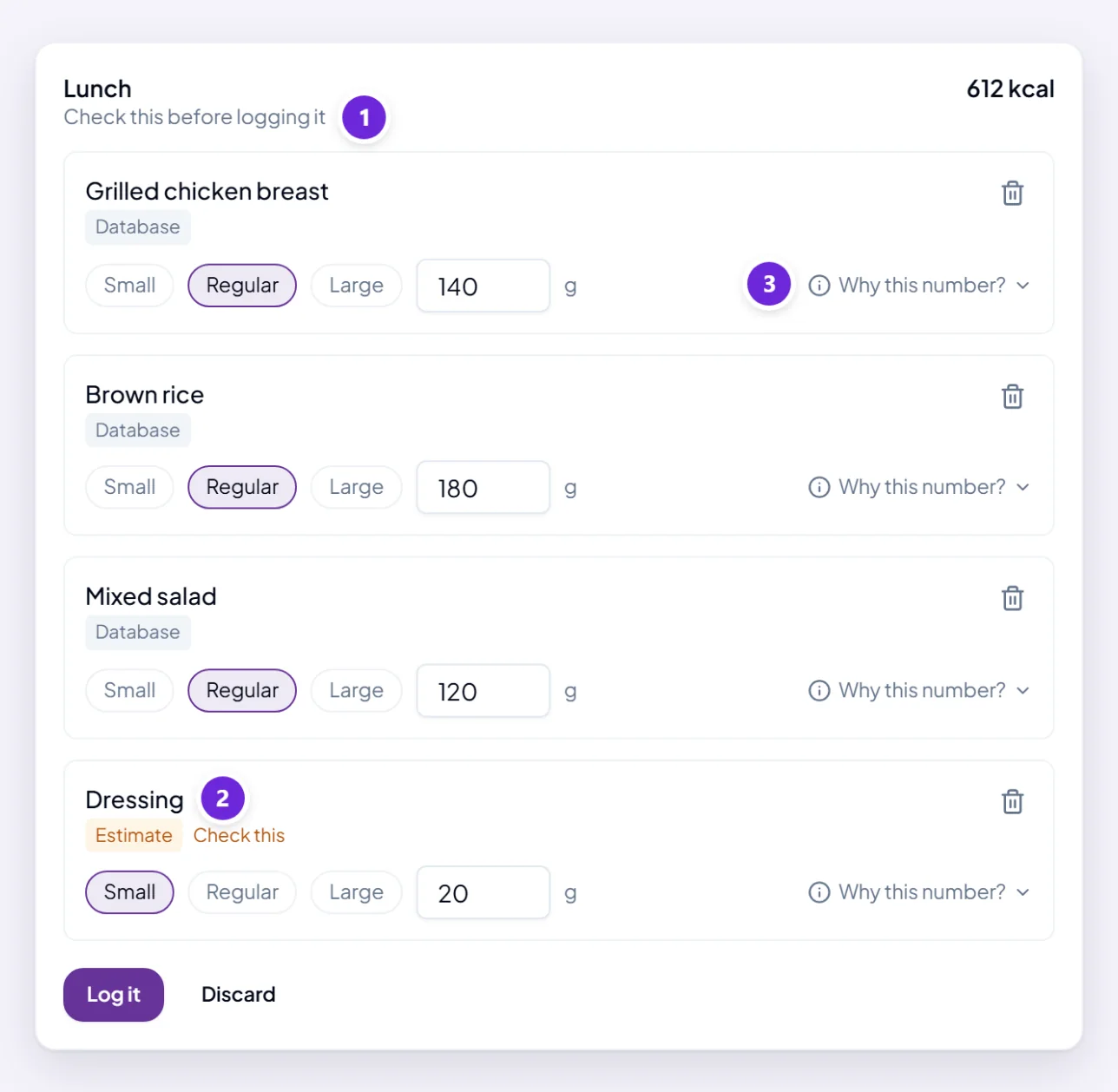
Every one of those makes a draft, not an entry. It appears under To review at the top of Today, marked Check this before logging it, and it stays a draft until you press Log it.
That is deliberate. Reading a plate from a photograph is right most of the time and wrong occasionally, and the moment to catch it is now rather than at the end of the week. Discard throws the draft away.
Water is the one exception — Add a cup counts straight away, and Undo the last cup takes it back.
Correcting what it read
Each item is its own row, and each can be changed without disturbing the others.
- Portion. Small, Regular and Large are one tap; the exact weight in grams sits underneath if you would rather be precise.
- Remove an item that is not really there — a garnish it added, a side you left.
- Say it in the conversation instead: "the toast was two slices, not one".
The numbers follow the amount, so changing a portion recalculates that row on its own.
Where each number came from
Every item carries a badge saying where its figures came from — Database, Product, Label, Restaurant, Manual or Estimate.
Estimate is the one worth a second look. It means nothing in the food database matched, so the figures are an informed guess rather than something retrieved. They are still useful — they are just not precise, and Orsola marks them rather than letting a guess pass as a fact.
Why this number? on an item opens the rest of it: the source, the dataset it came from, the amount used, and how confident it is.
Changing a meal you already logged
Open it from Today and edit it exactly the same way. Delete removes it, and Undo appears for a few seconds afterwards in case that was a slip.
Something you eat often is worth keeping: Save to log again gives it a name and files it under Foods, where one tap logs it next time.
Logging out loud
Talking is the quickest way to log something. Orsola reads back what it heard and asks before saving, because a misheard meal is worse than a slow one — and a weight said out loud is confirmed the same way before it goes near your trend.
Two things differ by voice. If you have chosen Calorie-free, it will not read calories aloud. And it cannot email or share anything from a spoken turn, because you cannot read what you are approving — ask for that in the typed chat.
Where to go next
See how your day and your weight are going is what the logging is for.